
GitHub Integration Examples
ZOLOZ provides a set of open-source repositories on GitHub to help you quickly integrate ZOLOZ products into your applications. These repositories include a server-side API SDK, backend integration examples, and mobile demo apps for both Android and iOS platforms.
Repositories Overview
Repository | Description | Language / Platform |
Java SDK for interacting with ZOLOZ APIs | Java | |
Server-side integration examples for all ZOLOZ products | Java | |
Android demo app with ZOLOZ SDK integration | Android (Java / Kotlin) | |
iOS demo app with ZOLOZ SDK integration | iOS (Objective-C / Swift) | |
HarmonyOS demo app with ZOLOZ SDK integration | HarmonyOS (ArkTS) |
ZOLOZ API SDK (Java)
The zoloz-api-sdk repository provides a Java SDK that simplifies server-side integration with the ZOLOZ gateway. It handles request signing, encryption, and API communication, allowing you to focus on your business logic.
This SDK is the foundation used by all server-side integration examples listed below.
For build instructions, Maven dependency setup, and usage details, please refer to the repository README.
Server-Side Integration Examples (Java)
The zoloz-integration-examples repository contains working Java examples for integrating various ZOLOZ products. All examples use the zoloz-api-sdk to interact with ZOLOZ APIs.
Basic Examples
These examples demonstrate the minimum setup required for each ZOLOZ product and integration mode:
Example | Description |
Integrate ZOLOZ Real ID via native mobile SDK | |
Integrate ZOLOZ Real ID via mobile web (H5) | |
Integrate ZOLOZ Connect via native mobile SDK | |
Integrate ZOLOZ Connect via mobile web (H5) | |
Capture alive faces via ZOLOZ client SDK | |
Capture alive faces in mobile browser | |
Compare two faces using Face Compare API | |
Capture documents via ZOLOZ client SDK | |
Capture documents in mobile browser | |
Recognize document images using ID Recognize API | |
Integrate ZOLOZ NFC Reader via native mobile SDK | |
Delete privacy data using Privacy Delete API |
Advanced Examples
These examples demonstrate more complex, end-to-end integration scenarios:
Example | Description |
Full service for ZOLOZ Connect (native) solution | |
Full service for ZOLOZ eKYC (H5) solution |
For detailed setup instructions and code walkthroughs, please refer to the repository README.
Android Demo App
The zoloz-demo-android repository provides a runnable Android demo application that demonstrates how to integrate the ZOLOZ SDK into an Android app. It covers the full eKYC flow — from collecting device meta information to launching the ZOLOZ SDK and handling results.
You can use this demo to:
- Quickly test ZOLOZ eKYC features on an Android device.
- Reference the source code to understand how to integrate the ZOLOZ Android SDK into your own project, including dependency configuration, SDK initialization, and callback handling.
The demo requires a backend server to communicate with the ZOLOZ API. You can set one up using the server-side integration examples mentioned above.
For prerequisites, build steps, and SDK integration details, please refer to the repository README.
iOS Demo App
The zoloz-demo-ios repository provides a runnable iOS demo application that demonstrates how to integrate the ZOLOZ SDK into an iOS app. It covers the full eKYC flow — from collecting device meta information to launching the ZOLOZ SDK and handling results.
You can use this demo to:
- Quickly test ZOLOZ eKYC features on an iOS device.
- Reference the source code to understand how to integrate the ZOLOZ iOS SDK into your own project, including CocoaPods setup, SDK initialization, and callback handling.
The demo requires a backend server to communicate with the ZOLOZ API. You can set one up using the server-side integration examples mentioned above.
For prerequisites, build steps, and SDK integration details, please refer to the repository README.
HarmonyOS Demo App
The zoloz-demo-harmonyOS repository provides a runnable HarmonyOS demo application that demonstrates how to integrate the ZOLOZ SDK into a HarmonyOS app using ArkTS.
You can use this demo to:
- Quickly test ZOLOZ eKYC features on a HarmonyOS device.
- Reference the source code to understand how to integrate the ZOLOZ HarmonyOS SDK into your own project, including ohpm package installation, SDK initialization, and result handling.
The ZOLOZ HarmonyOS SDK (@zoloz/zolozkit) is available via the OpenHarmony ohpm repository or can be manually installed from GitHub. DevEco Studio 5.0.5 or later is required.
The demo requires a backend server to communicate with the ZOLOZ API. You can set one up using the server-side integration examples mentioned above.
For prerequisites, installation methods, and SDK integration details, please refer to the repository README.
Typical Integration Architecture
The following diagram illustrates how these components work together in a typical ZOLOZ integration:
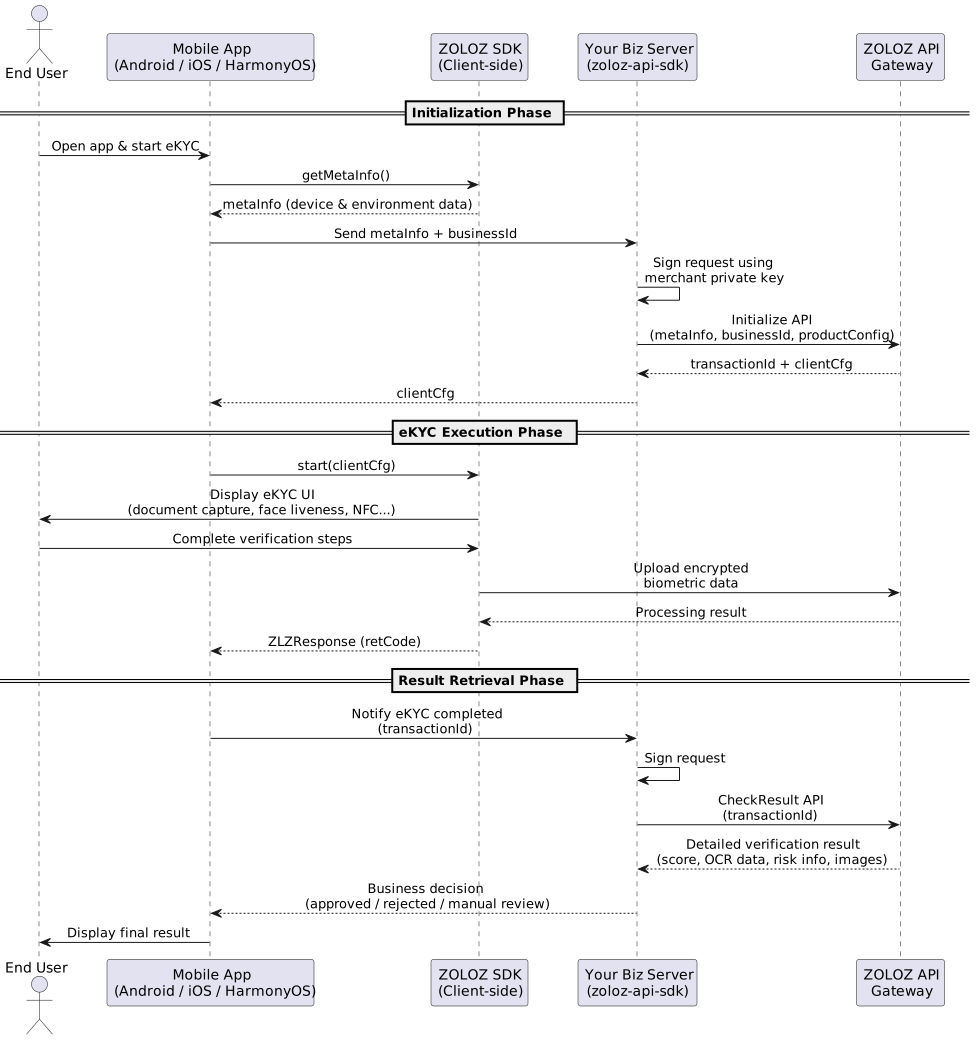
Key components:
Component | Repository | Role |
ZOLOZ SDK (Client) | Collects device meta info, renders eKYC UI, captures biometric data | |
Your Biz Server | Bridges mobile app and ZOLOZ API; handles request signing and business logic | |
zoloz-api-sdk | Java library used by your server to sign, encrypt, and communicate with ZOLOZ gateway | |
ZOLOZ API Gateway | ZOLOZ cloud service that processes verification requests |
Related Resources
- App SDK-mode integration: Full guide to integrating ZOLOZ via native mobile SDK.
- Mobile web (H5)-mode integration: Guide to H5 web-based integration.
- API Reference: Complete ZOLOZ API documentation.
- Android SDK Reference: Android SDK class reference.
- iOS SDK Reference: iOS SDK class reference.
- Integration of ZOLOZ HarmonyOS SDK: HarmonyOS SDK integration guide.
- Get API Credentials: How to obtain your API credentials.