
Launch of Unified Workbench for Centralized Task Management and Dashboard
Unified Workbench Enhancement in Matrix Platform
Effective Date: Upon Release
To: All Matrix Customers and Partners
From: Anti-Money Laundering (AML) Product & Platform Leadership Team
Introduction: Addressing Fragmented Workflows and Task Oversight Risk
We are pleased to announce the rollout of a major enhancement to the Matrix platform: a unified Workbench that consolidates to‑do tasks under review and risk dashboards across Name Screening (NSS), Transaction Monitoring (TMS), and Customer Risk Rating (CRR).
In our collaboration with clients, we have observed several recurring challenges in day‑to‑day operations:
- Fragmented User Journeys
Analysts frequently switch between NSS, TMS, and CRR modules to identify and process their tasks requiring attention, resulting in unnecessary navigation overhead and cognitive load. - Lack of a Unified Starting Point
After logging in, users are not guided to a single place that clearly surfaces “what needs to be handled now,” which increases time to action and training effort for new users. - Limited Visibility for Supervisors
Supervisors and reviewers lack a consolidated view of team‑wide tasks and backlog across modules, which may increase the risk of delayed or missed case handling.
To address these operational and oversight challenges, we are introducing the Workbench – Tasks and Workbench – Dashboard views, along with a simplified Portal entry, to provide a single, coherent starting point for daily work and management oversight.
Innovative Solution: Unified “Workbench – Tasks & Dashboard” Experience
Our enhanced architecture introduces a centralized Workbench that structures user workflows into two complementary views:
- Workbench – Tasks
A unified To‑Do center providing a unified view of tasks under review across NSS, TMS, and CRR. - Workbench – Dashboard
A consolidated risk dashboard view integrating existing NSS, TMS, and CRR dashboards into a single, scrollable page.
In addition, the Portal entry has been streamlined into a single “Enter System” button that lands users directly on the Workbench.
Workbench – Tasks: Centralized To‑Do Management Across Modules
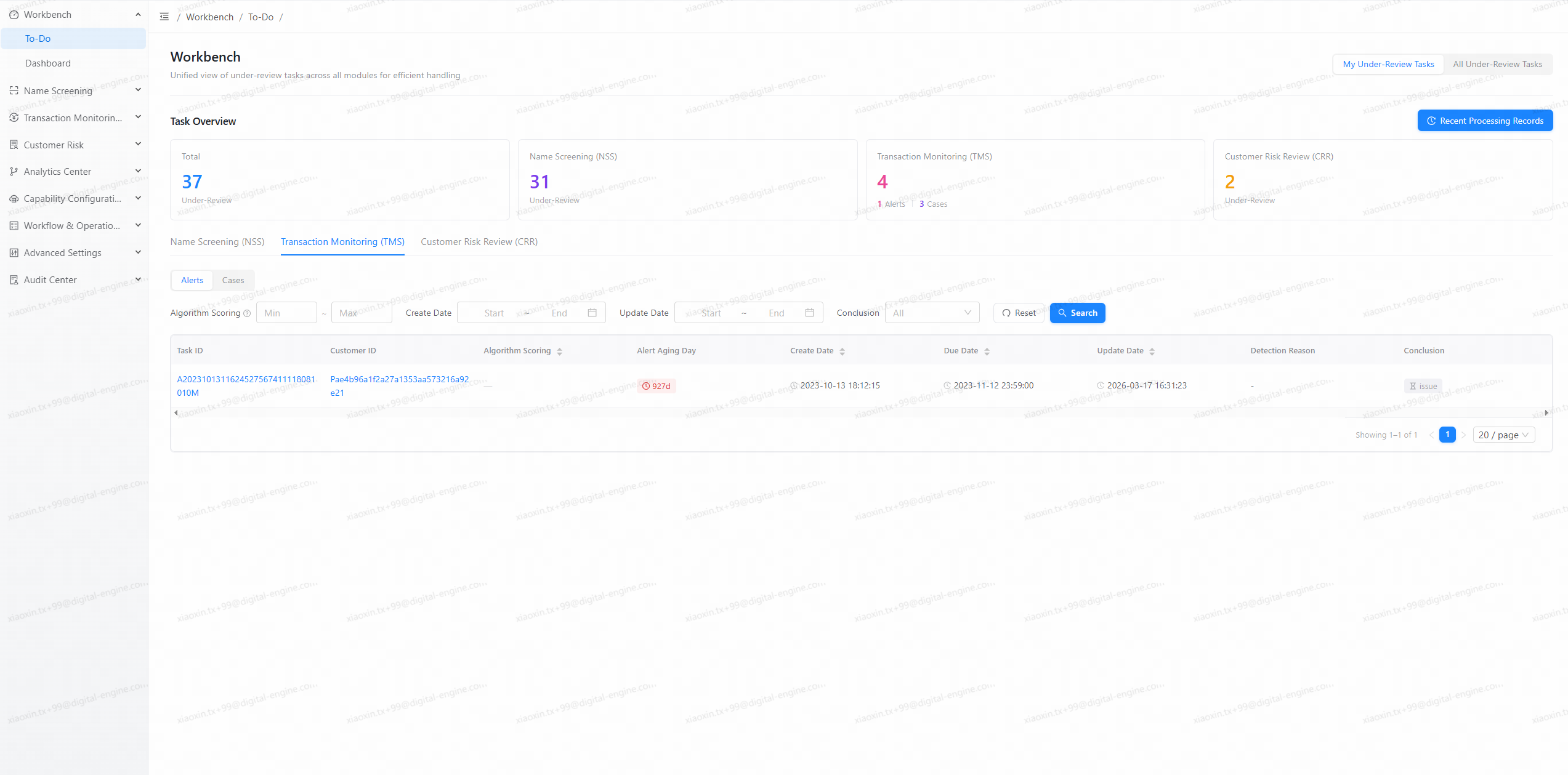
1. Unified Aggregation Across NSS / TMS / CRR
The Workbench – Tasks page serves as the default landing view after login and provides a consolidated list of tasks requiring attention from:
- Name Screening (NSS): alerts under review.
- Transaction Monitoring (TMS): alerts and cases under review.
- Customer Risk Rating (CRR): EDD tasks under review.
Closed or fully processed Alerts, Cases, and EDD items are intentionally excluded from the Workbench in order to keep the user’s focus on actionable workload.
All content is governed by tenant‑level and user‑level permissions. Products or modules not enabled for a tenant will not be displayed in the Workbench.
2. Dual Perspectives: “My Under-Review Tasks” and “All Under-Review Tasks”
To address the differing needs of analysts and supervisors, the Workbench introduces two primary perspectives:
- My Under-Review Tasks
- Displays only tasks under review assigned to the current user.
- Designed for frontline analysts to quickly identify and act on their personal queue of alerts, cases, and EDD tasks.
- All Under-Review Tasks
- Displays all tasks requiring attention within the current user’s permission scope, including:
- Tasks under review (assigned / in progress)
- Pending tasks (unassigned alerts that still require action)
- Designed for supervisors and reviewers to monitor team‑wide workload, backlog, and processing status across NSS, TMS, and CRR.
Users can switch perspectives with a simple toggle at the top of the page without leaving the Workbench context.
3. Key Task Metrics and Click‑Through Navigation
At the top of Workbench – Tasks, a core metrics area provides an at‑a‑glance overview under the current perspective. The following KPI cards are displayed:
- Total Under Review
- NSS Under Review
- TMS Under Review
- CRR Under Review
These metrics reflect the current scope of To‑Do review tasks under the chosen perspective.
Each metric card is interactive. By clicking a card, the corresponding module’s task list is automatically brought into focus in the lower section of the page, enabling a seamless jump from overview metrics to actionable task lists.
This design ensures that both analysts and supervisors can instantly identify where workload is concentrated and navigate to the relevant items with minimal friction.
4. Module‑Specific Task Views with Targeted Filters
Within the Workbench – Tasks view, tasks are further organized by module Tabs, ensuring familiarity with existing workflows while eliminating cross‑module navigation:
- Name Screening (NSS)
- Dedicated tab for NSS alerts under review or requiring review.
- Supports filtering by key dimensions such as alert type, algorithm score range, and time ranges (e.g., creation and last update time).
- Allows sorting and focused querying to surface the most urgent or relevant alerts first.
- Transaction Monitoring (TMS)
- Dedicated tab with a second‑level toggle for Alerts and Cases.
- Supports filtering by algorithm scoring (for alerts), creation and update time, and alert/case conclusion (e.g., Issue / No Issue).
- Enables users to prioritize monitoring tasks based on due dates, aging, and risk indicators.
- Customer Risk Rating (CRR)
- Dedicated tab for EDD tasks under review.
- Supports filtering by creation and update time, as well as EDD conclusions (e.g., Adjust / Maintain / Terminate).
- Helps reviewers quickly identify customers whose risk assessments are pending completion or require adjustment.
The detailed, module‑specific table layouts remain consistent with existing product behavior, while being accessed from this unified Workbench entry.
5. Recent Activity Records: Rapid Return to In‑Progress Work
For the My Tasks Under Review perspective, the Workbench introduces a Recent Activity Records section tailored to individual users:
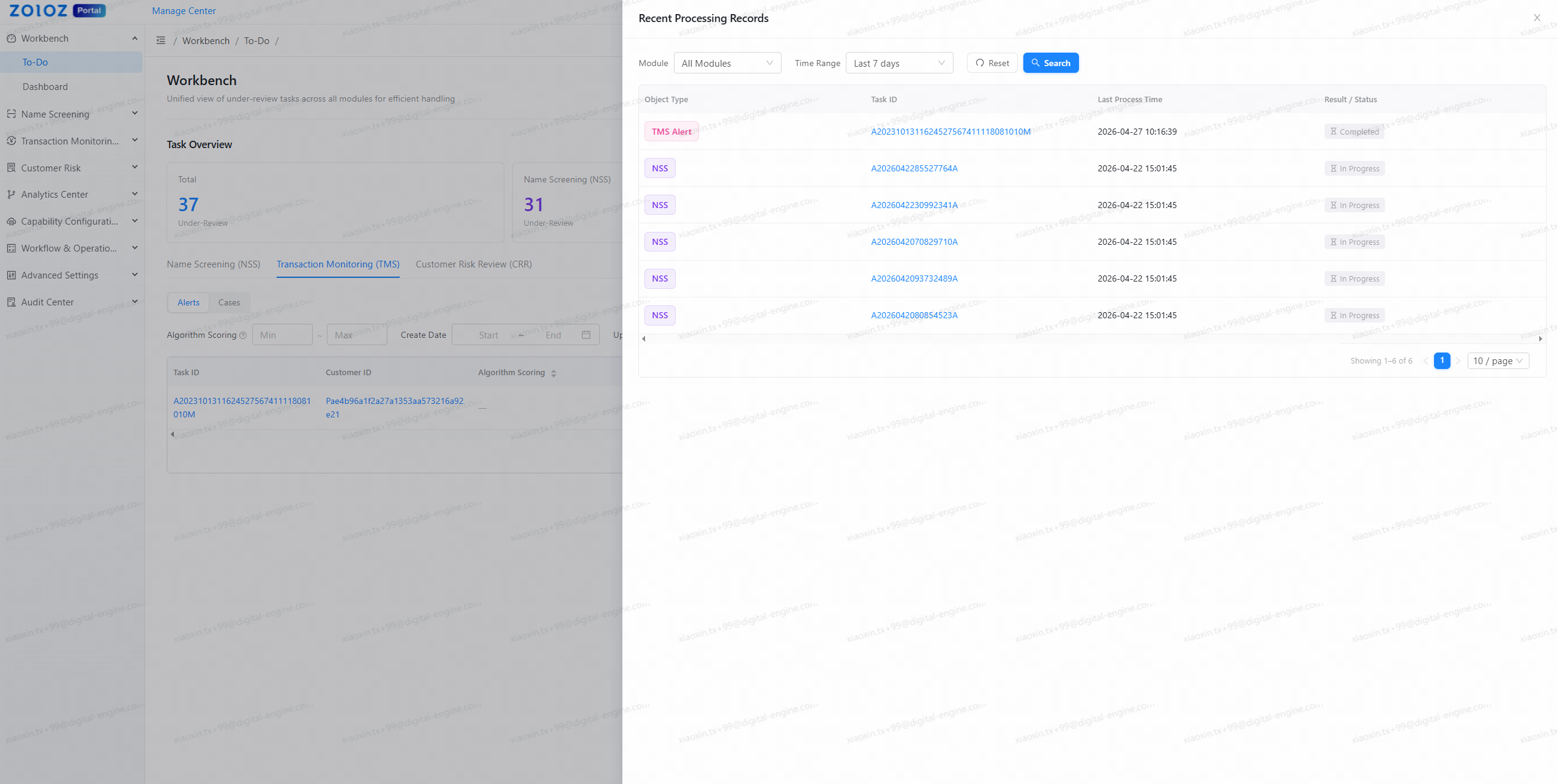
- Scope
- NSS alerts
- TMS alerts
- TMS cases
- CRR EDD recently processed by the current user.
- Key information
- Task identifier, record type, last processed time, and current status (In Progress / Completed), with direct navigation to detailed views.
This capability allows analysts to quickly return to items they recently reviewed or left in progress, supporting efficient follow‑up actions and reducing the risk of losing track of ongoing work.
Workbench – Dashboard: Unified View of Risk and Processing Status
The Workbench – Dashboard view consolidates previously separate dashboards into a single, integrated page:
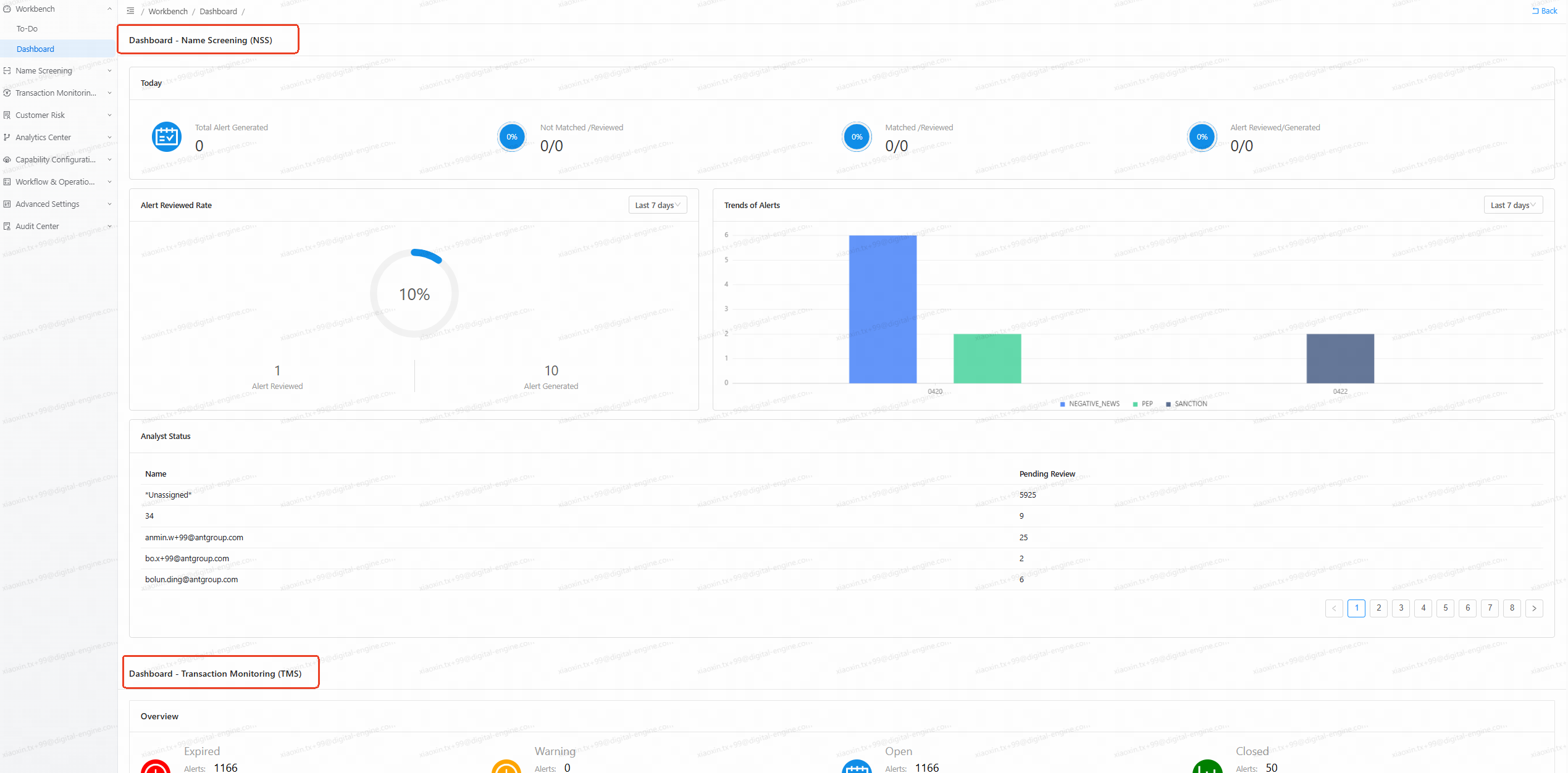
- Integrated NSS / TMS / CRR Dashboards
- Existing dashboards for Name Screening, Transaction Monitoring, and Customer Risk Rating are now presented as a unified, scrollable view under the Workbench – Dashboard tab.
- Per‑tenant permissions determine which product dashboards are visible to each user.
- Simplified Access
- The legacy, module‑specific dashboard entries are deprecated.
- All dashboard access is centralized under the Workbench, ensuring consistent navigation and a clearer mental model for users.
This unified dashboard view enables MLROs, supervisors, and administrators with appropriate permissions to quickly understand overall risk exposure and processing performance across all active products.
Optimizing Your Workflow with the New Workbench
The unified Workbench has been specifically designed to improve two core operational scenarios:
- Frontline Analysts
- Start each day from a single Workbench – Tasks (To‑Do) view that surfaces all NSS / TMS / CRR review tasks assigned to them.
- Use module Tabs and filters to prioritize by due dates, aging, or algorithm scores.
- Quickly return to recently processed items via Recent Activity Records.
- Supervisors and Reviewers
- Leverage the “All Tasks Under Review” perspective and top‑level metrics to monitor all tasks requiring attention, including both pending and under‑review items, across modules.
- Identify potential bottlenecks in specific products from the aggregated metrics.
- Use the unified Dashboard view to correlate risk indicators with processing throughput.
Collectively, these enhancements are designed to:
- Reduce system learning and onboarding time.
- Increase efficiency in handling alerts, cases, and EDD tasks that require review.
- Lower the risk of missed or delayed handling due to fragmented navigation.
Portal Entry Simplification and Rollout
To align with the new Workbench experience, the Portal entry has been streamlined:
- Previous Behavior
- Separate entries from the Portal to different product dashboards.
- New Behavior
- A single [Enter System] button.
- Default landing page: Workbench – Tasks (To‑Do).
- Users can switch between Tasks / Dashboard from within the Workbench.
This enhancement will be rolled out as a one‑time global update to all tenants and will take effect immediately upon release. There is no configuration switch to retain the previous dashboard entry behavior; the Workbench fully replaces the legacy entry points.
We appreciate your continued trust in Matrix and look forward to supporting your compliance operations with a more integrated and efficient experience.