
AES-GCM message encryption and decryption
Message encryption and decryption
The ZOLOZ gateway protocol provides the capability of message encryption to ensure the data is not tampered during message transmission.
The ZOLOZ gateway protocol provides the capability of message encryption to ensure the data is not tampered during message transmission. If the request sent by the merchant is encrypted, the response returned by the ZOLOZ service is also encrypted; otherwise, the response returned by the ZOLOZ service is not encrypted.
As the data that the ZOLOZ service deals with might contain sensitive information, to enhance the message transmission security, the ZOLOZ service encrypts the response message. The sensitive information includes all the sensitive personally identifiable information, such as name, ID number, birthday, address, face.
The symmetric encryption algorithm is AES-GCM (AEAD, encryption and authentication in one). Compared with the legacy RSA_AES algorithm (AES-ECB, encryption only), AES-GCM provides ciphertext integrity authentication with a 128-bit authentication tag. The legacy RSA_AES algorithm is still accepted for backward compatibility; the client must determine the decryption algorithm from the algorithm field of the response Encrypt header rather than from a local configuration.
Encrypt a message
Encryption process flow
The following diagram shows how to encrypt a request message from the merchant's perspective and how to encrypt a response message from the ZOLOZ service's perspective.
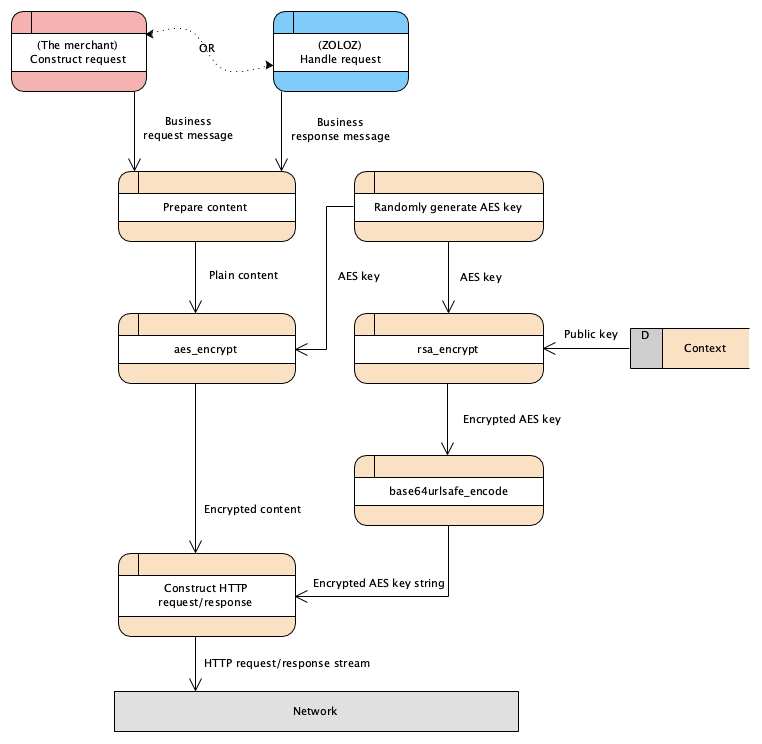
Figure 1. Message encryption activity diagram
Procedure to encrypt a message
1. Get the public key
- For the request message, a RSA 2048 key-pair is generated in the ZOLOZ system when the account of the merchant is created. The generated key-pair is unique for each merchant and includes a public key. The merchant needs to acquire the public key beforehand.
- For the response message, a RSA 2048 key-pair must be generated on the merchant's side. The generated key-pair includes a public key, which must be registered in the ZOLOZ system before any request is sent. The ZOLOZ service then uses the registered public key for the succeeding response message encryption.
2. Prepare the content to be encrypted
The content to be encrypted is the plain message of the business request/response, typically a JSON string.
3. Generate the AES symmetric key
Randomly generate a 256-bits data as the AES symmetric key.
Note: The same AES key is reused in both directions of one request/response exchange: the merchant uses it to encrypt the request body, and the ZOLOZ service uses it (carried in the
Encryptheader of the request) to encrypt the response body. A new random key must be generated for each new request.
4. Generate the initialization vector (IV)
Randomly generate a 12-byte (96-bit) IV with a cryptographically secure random generator. The IV must be unique for each message under the same key. The IV is not a secret and is transmitted in the Encrypt header in plain form.
5. Encrypt the content
Encrypt the content with AES/GCM/NoPadding and a 128-bit authentication tag by using the following formulas:
CIPHERTEXT_AND_TAG=aes_gcm_encrypt($CONTENT_TO_BE_ENCRYPTED, $AES_KEY, $IV)
CIPHERTEXT_STRING=base64_encode($CIPHERTEXT)
TAG_STRING=base64urlsafe_encode($TAG)
IV_STRING=base64urlsafe_encode($IV)
Methods that are used:
aes_gcm_encrypt: the AEAD method to encrypt and authenticate the message by using the AES-GCM algorithm. The output is the ciphertext with the 16-byte (128-bit) authentication tag appended at the end.base64_encode: the method to encode the ciphertext in standard Base64 (with padding). The result is used as the HTTP body.base64urlsafe_encode: the method to encode the binary data in Base64URL without padding. The results are used for theivandtagfields of theEncryptheader. No padding is used to avoid the=character, which conflicts with thekey=valuepair syntax of the header.
Input parameters:
CONTENT_TO_BE_ENCRYPTED: the content string that is prepared in Step 2.AES_KEY: the AES symmetric key that is generated in Step 3.IV: the initialization vector that is generated in Step 4.
Output parameters:
CIPHERTEXT_STRING: the string of the encrypted content (without the tag). This is the HTTP body.IV_STRING: the Base64URL-encoded IV.TAG_STRING: the Base64URL-encoded authentication tag.
Note: No additional authenticated data (AAD) is used. The authentication tag only protects the ciphertext.
6. Encrypt the AES key
Encrypt the AES key by using the following formula:
ENCYRPTED_AES_KEY=urlencode(base64_encode(rsa_encrypt($AES_KEY, $PUBLIC_KEY)))Methods that are used:
rsa_encrypt: the method to encrypt the AES key with RSA/ECB/PKCS1Padding. For more information, see rsa_encrypt.base64_encode: the method to encode the encrypted data in standard Base64.urlencode: the method to URL-encode the result so that it can be safely carried as a value in theEncryptheader.
Input parameters:
AES_KEY: the AES symmetric key that is generated in Step 3.PUBLIC_KEY: the public key that is obtained in Step 1.
Output parameter:
ENCYRPTED_AES_KEY: the string of the encrypted AES key.
7. Configure the header and body
a. Configure the Encrypt header.
Specify the encrypted AES key, the IV, and the authentication tag in the Encrypt field of the HTTP header in the following format:
Encrypt: algorithm=RSA_AES_GCM, symmetricKey=<ENCYRPTED_AES_KEY>, iv=<IV_STRING>, tag=<TAG_STRING>b. Configure the Content-Type header.
Set the content type as text/plain :
content-type: text/plainc. Configure the HTTP body.
Set the encrypted content string (CIPHERTEXT_STRING that is obtained from Step 5, without the IV and the tag) as the HTTP body.
Decrypt a message
Decryption process flow
The following diagram shows how to decrypt a request message from the ZOLOZ service's perspective and how to decrypt a response message from the merchant's perspective.
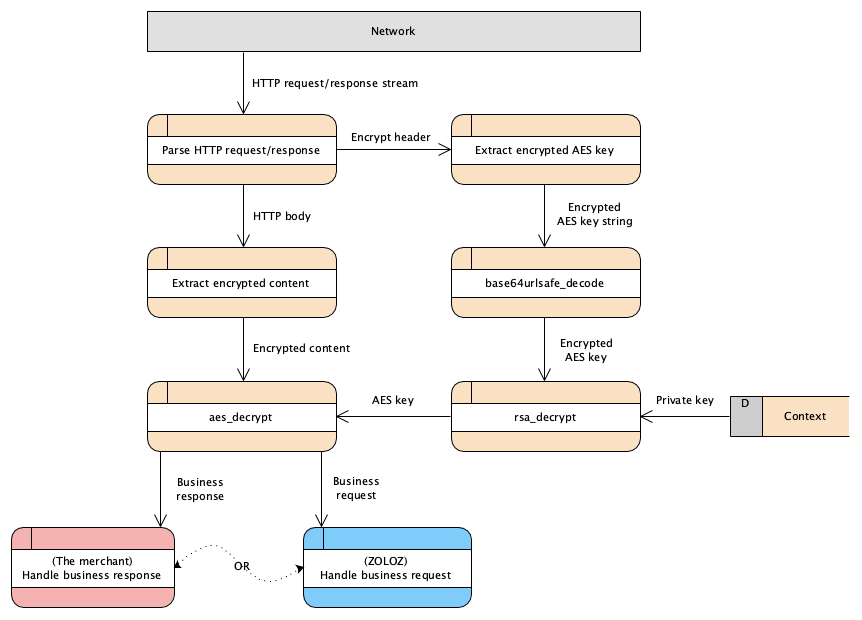
Figure 2. Message decryption activity diagram
Procedure to decrypt a message
1. Get the private key
- For the request message, a RSA 2048 key-pair is generated in the ZOLOZ system when the account of the merchant is created. The generated key-pair is unique for each merchant and includes a private key. The ZOLOZ service then uses the private key to decrypt the symmetric key that is carried with the encrypted request.
- For the response message, a RSA 2048 key-pair must be generated on the merchant's side. The generated key-pair includes a private key. The merchant then uses the private key to decrypt the symmetric key that is carried with the encrypted response.
2. Get the content to be decrypted
The content to be decrypted is the whole HTTP body that has been encrypted (the ciphertext string, without the IV and the tag).
3. Extract the encryption parameters
Extract the encrypted AES symmetric key, the IV, and the authentication tag from the Encrypt field of the HTTP request/response header.
Encrypt: algorithm=RSA_AES_GCM, symmetricKey=<ENCRYPTED_AES_KEY>, iv=<IV_STRING>, tag=<TAG_STRING>Note: Determine the decryption algorithm from the
algorithmfield of the header. If the value isRSA_AES, decrypt the body with the legacy AES-ECB algorithm; if the value isRSA_AES_GCM, follow the steps below. This guarantees that the client can still process the response correctly when the ZOLOZ service rolls back to the legacy algorithm.
4. Decrypt the AES key
Decrypt the AES key by using the following formula:
AES_KEY=rsa_decrypt(base64_decode(urldecode($ENCRYPTED_AES_KEY)), $PRIVATE_KEY)Methods that are used:
urldecode: the method to decode the URL-encoded value.base64_decode: the method to decode the Base64-encoded data.rsa_decrypt: the method to decrypt the cypher text. For more information, see rsa_decrypt.
Input parameters:
ENCRYPTED_AES_KEY: the encrypted AES key that is extracted in Step 3.PRIVATE_KEY: the private key that is obtained in Step 1.
Output parameter:
AES_KEY: the initial AES key that is randomly generated to encrypt the message content.
5. Decrypt and verify the content
Base64-decode the HTTP body to get the ciphertext, Base64URL-decode the iv and tag values, and then decrypt and authenticate the content by using the following formula:
CIPHERTEXT_AND_TAG=concat(base64_decode($Content_To_Be_Decrypted), base64urlsafe_decode($TAG_STRING))
PLAIN_CONTENT_STRING=utf8_encode(aes_gcm_decrypt($CIPHERTEXT_AND_TAG, $AES_KEY, base64urlsafe_decode($IV_STRING)))
Methods that are used:
concat: the method to append the 16-byte authentication tag to the end of the ciphertext (the input layout required by most AES-GCM implementations for decryption).aes_gcm_decrypt: the AEAD method to decrypt and authenticate the message by using the AES-GCM algorithm. If the authentication tag does not match, the decryption fails and no plaintext is returned; the message must be rejected.utf8_encode: the method to encode the binary data to the text string in UTF-8. For more information, see utf8_encode.
Input parameters:
Content_To_Be_Decrypted: the content to be decrypted, which is obtained in Step 2.TAG_STRING/IV_STRING: the authentication tag and the IV that are extracted in Step 3.AES_KEY: the AES symmetric key that is obtained in Step 4.
Output parameter:
PLAIN_CONTENT_STRING: the plain content string to be consumed, typically it's a JSON string.